


Best Free PST File Viewer for Windows 11 (No Outlook Needed)




Got stuck when you want to open a PST file but don’t have Microsoft Outlook installed?
This guide compares the top free tools that act as a PST viewer on Windows, helping you choose the right one to view, and in some cases, export content of the PST file.
This guide is useful if you:
- Need to open PST files without Outlook
- Need PST viewers that are truly free (not just “free to install” with paywalls)
- Need to read PST files offline with no file uploads
- Need to search through all emails in the PST file and export the needed information
- Have old .pst archives that are not readable by certain viewers.
- Have large PST archives (50GB+)
- Need to check emails inside a corrupted PST file
All these PST viewers listed below are tested/confirmed to work smoothly on Windows 11 (and earlier versions like Windows 10/8), with no Outlook required.
Quick Comparison: The Best Free PST Viewers
|
PST Viewer |
Price |
Works Without Outlook? |
Windows 11 Compatible? |
Can Export? |
Max PST Size |
Corrupted File Support? |
Best For |
|
GoldFynch |
Free |
Yes |
Yes |
No |
Below 10GB |
No |
Simple viewing |
|
Enolsoft PST Viewer |
Free/$9.99 /$19.99 |
Yes |
Yes |
eml/ics/vcf |
Unlimited |
No |
Quick viewing and exporting |
|
XSTReader |
Free |
Yes |
Yes |
HTML, RTF, and Plain Text |
Unlimited |
No |
Best all‑around free viewer |
|
SysTools PST Viewer |
Free/$69/$129 |
Yes |
Yes |
No |
Unlimited |
Paid only |
Best for damaged PST files |
|
Google GWMMO Tools |
Free |
Yes |
Yes |
No |
Below 5GB |
No |
Import PST files to Gmail |
What is PST, and why use a third-party viewer?
Outlook stores all its data (emails, messages, contacts, tasks, notes, and calendar data) in a single file called PST.
Typically the file is located in the "Outlook Files" folder in "Documents."
Why use a third-party viewer
In Windows 11, the new Outlook has limited support for importing PST files and requires a Microsoft 365 subscription.
Most archived PST files can be several gigabytes in size. Outlook 2003's personal folders (.pst files) can be up to 50 GB in size. Outlook often struggles with those large PST files, while third-party PST viewers can handle them without crashing.
A more advanced tool is a must when you need to work with encrypted or corrupted PST files.
Key Features to Look for in a PST Viewer
A PST viewer is a software tool used to display and extract PST files. These viewers allow users to open, view, and manage PST file data without the need of MS Outlook.
When selecting a PST file viewer for Windows, consider:
- Compatibility with Windows 11
- Ability to open large PST files
- Whether a free version is available
- Privacy (offline vs cloud-based tools)
- Open PST files without Outlook
- Ability to preview email, contacts, attachments, and folder structure
- Supports both "Unicode" files (newer Outlook) and "ANSI" files (older Outlook).
- Provides a search feature that makes it easy to find and add PST files from unknown locations.
- Maintains all properties and makes no changes or modifications to the original content of the PST file.
- Convert PST to formats like MBOX, MSG, EML, PDF, DOC, CSV, etc.
- Works with password-protected or corrupted PST files
Note: Many 'free' viewers listed online are trials with export or other limits – always check official sites. For very large (>30 GB) or heavily corrupted files, free tools may struggle – consider paid tool if needed. Also, don't upload sensitive PST files to online viewers.
GoldFynch PST Viewer: Best for quick PST file lookups (in-browser/Chrome Extension)
Official Site: https://goldfynch.com/pst-viewer/
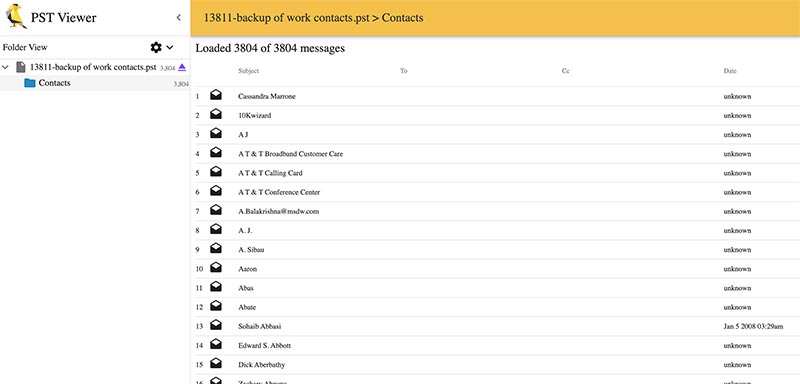
GoldFynch PST Viewer is a web-based application that offers a quick way to view the contents of PST (Personal Storage Table) and OST (Offline Storage Table) files. Users just need to drag and drop email files to the main interface and it will display both the name, email address, send time, main content, and attachment. You can directly save the attachment or choose to download a specific file separately. It supports raw view to help you find the exact file to download easily.
✅ Works on Windows 11? Yes - tested on Windows 11 24H2 (March 2026)
✅ Truly free? Yes - no sign-up or registration needed, no watermark, no trial limit, no credit card
What I tested:
- Opened a 1.8GB PST file with 6k+ emails → loaded in 23 seconds
- Viewed attachments and export selected attachments → Success
- Open PST Files on Windows 11 Without Outlook installed → Success
- Windows 11 & Large File Performance → Works well with files below 5GB; when the sizes reach 10GB+, it takes a long time to load and even gets crashed.
Limitations to know:
- ❌ Cannot export in free version (paid upgrade required)
- ❌ Don't support Corrupted PST files
- ❌ No search option
Privacy Warning: Local vs. Online
Unlike other online file viewers, GoldFynch PST Viewer runs locally in the browser. The application explicitly states that all file processing is performed locally in the web browser(client-side), so the data remains private. But as you need to upload the file you still need to make sure that your own internet is secure.
Best for: Users who need to quickly view PST or OST files without software.
Enolsoft PST Viewer: Best for Speed & Simplicity
Official Site: https://www.enolsoft.com/pst-viewer.html
The software is lightweight and does not consume too many system resources, performing smoothly even on older machines. Which makes it suitable for beginners who just need to quickly open PST files. It can open multiple PST files at once and provide two viewing modes. The searching function is very fast and can export to eml/ics/vcf formats.

✅ Works on Windows 11? Yes - tested on Windows 11 24H2 (March 2026)
✅ Truly free? Yes - the site have a free and pro version; the free version can view PST files for free no watermark and no trial limit
What I tested:
- Drag and Drop to add PST files → Success
- Opened a 1.8GB PST file with 6k+ emails → loaded in 8 seconds
- Viewed attachments and supports exporting
- Open PST Files on Windows 11 Without Outlook installed → Success
- Windows 11 & Large File Performance → Handles 23GB archives without lag
- View corrupted files is not supported
- Searched emails by sender/date → results instant
Limitations to know:
- ❌ Don't support Corrupted PST files
Best for: Users who need a simple and lightweight PST Viewer for both Windows and Mac.
XstReader: Best for Open Source and All‑around Free
Official Site: https://github.com/Dijji/XstReader
In our test, we found almost all the free PST viewers limit the function of searching and exporting. XstReader is an open-source software that allows you to open both .pst and .ost files; it is standalone, doesn't require Microsoft Outlook, and is the only free app that lets you export the emails in HTML, RTF, and plain text files.

✅ Works on Windows 11? Yes - tested on Windows 11 24H2 (March 2026)
✅ Truly free? Yes - Open Source
What I tested:
- Open PST and OST files → Success
- Drag and Drop to add PST files → No Success
- Opened a 1.8GB PST file with 6k+ emails → loaded in 5 seconds
- Viewed attachments with exporting supported
- Use the search function to locate a specific email → Success
- Open PST Files on Windows 11 Without Outlook installed → Success
- Windows 11 & Large File Performance → Works well with a 23GB+ PST file
- Export all emails using the export option → Success
Limitations to know:
- ❌ Don't support Corrupted PST files
- ❌ Failed to show some email address for certain emails
Best for: Users who need a free PST viewer for viewing PST or OST files and exporting the items as HTML, RTF, and plain text files.
SysTools PST Viewer (Free Edition): Best for Viewing Large PST Files
Official Site: https://www.systoolsgroup.com/pst-viewer.html
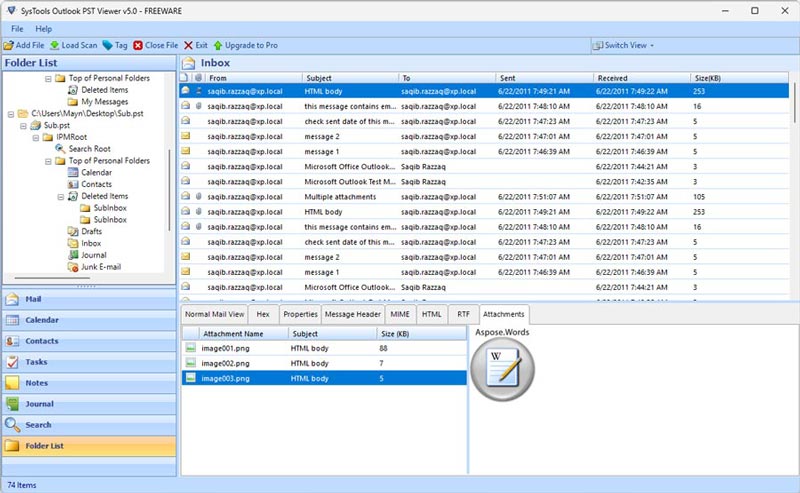
SysTools PST Viewer (Free Edition) is simple software that can view PST files without any file size limitation. Viewing a PST file is totally free. It provides eight display modes for viewing emails and attachments: Normal mail view, Hex, Properties, Message Header, MIME, HTML, RTF, and Attachments.
The software’s interface design isn’t very practical. The preview window is placed in the bottom-right quarter of the screen, which often prevents files from being displayed completely. Although you can drag the view to see the rest of the content, it’s not very convenient. In addition, while the program claims to support eight preview modes, many of them frequently display a “No preview available” message.
In addition, there are some advanced features such as search and export into PDF, remove encryption, viewing multiple files, handling corrupted files with two scan modes, etc. (purchase is required to unlock all features, with prices starting at $69):
✅ Works on Windows 11? Yes - tested on Windows 11 24H2 (March 2026)
✅ Truly free? Yes - The site have a free and pro version; the free version can view PST files for free no watermark and no trial limit
What I tested:
- Drag and Drop to add PST files → No Success
- Opened a 1.8GB PST file with 6k+ emails → loaded in 19 seconds
- Viewed attachments, but no exporting support
- Open PST Files on Windows 11 Without Outlook installed → Success
- Windows 11 & Large File Performance → Handles 23 GB+ archives without lag
Limitations to know:
- ❌ Cannot export to PDF in free version (paid upgrade required)
- ❌ prompts to upgrade for exporting and searching.
- ❌ Viewing corrupted files is not supported in the free version.
- ❌ No search option
Best for: Users who need to view large-size PST files.
Google GWMMO Tools: Best for View and migrate a PST file to Gmail
Official Site: https://tools.google.com/dlpage/gsmmo/
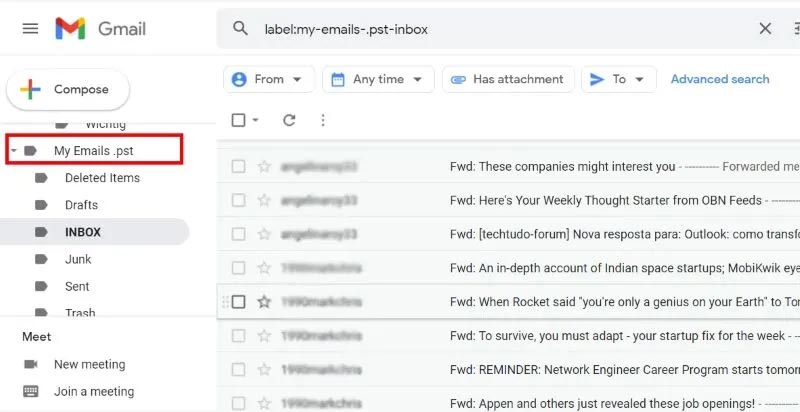
If you use Gmail, you can open a PST file in Gmail using the GWMMO tool.
It is a free software from Google that supports exporting PST files to Gmail and exploring PST files without Outlook.
⚠️ Warning: The Google migration tool will mix the PST emails in among your normal emails, so don’t do this unless you don’t mind having them in your account forever.
✅ Works on Windows 11? Yes — tested on Windows 11 24H2 (March 2026)
✅ Truly free? Yes — you just need to have a Google account
What I tested:
- Import a 1.8GB PST file with 6k+ emails → loaded in 43 seconds
- Open PST Files on Windows 11 Without Outlook installed → Success
- Windows 11 & Large File Performance → Works well with files below 3GB, when the sizes reach 5GB+ it takes a long time to loading and even get crashed.
Limitations to know:
- ❌ Dont support Corrupted PST files
- ❌ Will mix the email with other email, which cause issue for some users
Best for: Users who want to import PST files to Gmail.
Common PST Viewer Problems (and Quick Fixes)
- PST is corrupted error — Use a viewer that supports damaged PST files.
- PST file is too large — PST files can grow very large, some even gets 50GB+, those large PST files may fail to load in some viewers, especially online file reader, please choose a viewer that have no size limit or try split/compress the PST file before viewing.
- Free version is limited — Many “free” PST viewers hide preview behind a paywall. The tools listed above allow full viewing for free.
- About PST metadata - For professionals metadata integrity is very important, some tools will change the Last Accessed simply when you just read it, so please choose PST viewers that are designed to read the file in Read-Only mode.
- PST file is password‑protected - PST passwords do NOT encrypt the file, it just locked the file, and most PST viewers will ask for the password before loading the file. If you know the password, enter it and the viewer will open the file normally. If you forgot the password, your options are limited, especially for free PST viewer.
- PST vs OST - Both PST and OST are archived Outlook data, the tools we listed above can all open PST files but most free PST viewers cannot open OST files because OST files are tied to an Outlook account.
And that’s a wrap!
Viewing a PST file can be challenging, especially if you don’t have Outlook installed. But tools like Elmedia, Downie, and Pulltube made it simple and painless.
I hope this overview help you with picking a good PST viewer, Let us know which one worked best for you in the comments below to help other Windows users.
If you're still having trouble opening a specific PST file, describe the issue in the comments – we might have the solution for you.

Bryan is the Chief Writer at Enolsoft for 15 years. He doesn’t just document software, he is more like a power user that bridges the gap between complex file management systems and the real people who use them, showing users the easiest way to turn digital chaos into streamlined efficiency.
Comments (0)
Leave a Reply