


How to Open Visio Files on Mac (.VSDX & .VSD) - 4 Easy Ways




Microsoft Visio is a powerful diagramming tool, but it sadly doesn't have a native version for Mac.
A couple of years ago, I was working on a project where a Windows-based engineering team kept sending over flowcharts and network diagrams as .vsdx files.
The problem? Our entire design department was on MacBooks - and double-clicking those files did absolutely nothing. No preview, no prompt, just… nothing. We spent an embarrassing amount of time screenshotting diagrams on a borrowed Windows laptop before finally figuring out better ways to handle it.
In this post, I'll walk you through 4 proven methods I've tested for opening Visio files (VSD, VSDX, VDX) on macOS - from free viewers and browser extensions to online tools and full-featured alternatives. Whether you just need a quick look at a diagram or actually want to edit it, I hope this saves you the headaches I went through.
What is Microsoft Visio?
Microsoft Visio is software for creating drawings and diagrams. It has been a staple in the Windows ecosystem since the early '90s and is widely used by engineers, IT professionals, project managers, etc.
Files created in Visio use the .vsdx extension (or .vsd in older versions).
Are .vsd and .vsdx files basically the same?
They’re not.
- .vsd is an older, harder-to-open format.
- .vsdx is newer, more compatible, and easier for Mac tools to handle.
The Challenge for Mac Users
Despite its popularity, Visio was never officially ported to macOS.
Of course, you can try the official Visio for the web; basic viewing functionality is available even without a Visio subscription. But, compared with the Windows desktop version, the web version has some limitations, and some old file types are not supported.
How to Run Microsoft Visio on a MacBook
If you need 100% Visio compatibility and are set on running the full Windows desktop version of Visio on your Mac. You will have to resort to virtual machines or tools like Parallels Desktop to run Windows apps on macOS.
But this option requires large RAM and storage and is really expensive (requires Windows license + virtualization software + Visio license)
If you only need to quickly view a Visio VSDX or VSD diagram someone sent you. Or you just need to have something with a similar function like Visio; the market has quite a few solid third-party apps and free viewers for Mac.
I will cover all of these solutions in the article below, so keep on reading.
Method 1: Enolsoft - Lightweight Visio Viewer and Converter for Mac
Strengths
- Open Any Visio Files: Drag and drop VSD, VSDX, or VDX files directly onto the app. No conversion, no upload needed.
- Maintain Original Formatting: View complex flowcharts, network diagrams, floor plans, etc. with good layout fidelity.
- Open multiple Visio files in separate tabbed windows
- Excellent reading experience with a collection of reading tools
- Export Visio files as PDF or image format
- Extract images from Visio files
- Rotate, bookmark, print, search within files
- Other features: bookmark, print, rotate, search, customize toolbar
Weaknesses
- Viewing only lacks editing capabilities and diagramming tools.
- Paid software
Best for - Users who only need a lightweight app to view multiple Visio files.
Pricing - The full version of Enolsoft Visio Viewer for Mac costs $9.99 from the Mac App Store, but it does offer a free trial.
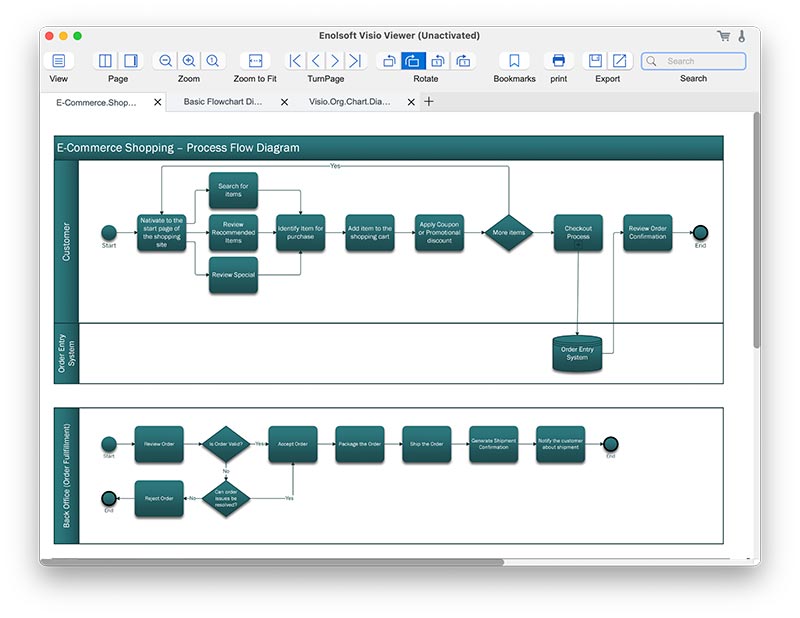
For Mac users who need a dedicated Visio viewer that works offline and has no file size limit, I recommend Enolsoft Visio Viewer for Mac. It opens files instantly and displays them exactly as intended, preserving all shapes, text, and connections.
Just drag your .vsdx or .vsd file into the app, and it opens instantly - no conversion needed, and you don't need to upload the file.
If you only need to check one specific page in a large diagram, you don't have to scroll through everything thanks to the built-in search function and tabbed, multi-page navigation.
When you need to share the diagram with someone else, you can also use this Visio reader to export Visio files to PDF or image formats like PNG or JPEG.
One thing to keep in mind: Enolsoft Visio Viewer for Mac can just open and convert Visio files; it is not an editor or creator. You can open, browse, search, print, and export—but you can't create or edit the diagram itself.
How to Open a VSDX or VSD File on Mac with Enolsoft Visio Viewer:
- Download & Install Enolsoft Visio Viewer on your Mac
- Launch the app. Drag and drop your .vsdx or .vsd file into the interface
- Use the tools to zoom in on details, search for specific text, or print the diagram
![]() 4. To share it, just go to File > Export and choose PDF or an image format
4. To share it, just go to File > Export and choose PDF or an image format
 4. To share it, just go to File > Export and choose PDF or an image format
In our test, Enolsoft displays layers and shapes perfectly for most complex VSDX files. and if we export the Visio file as a PDF, the original elements get retained, including lines, color, fill, etc.
Method 2: Open VSD/VSDX Files on Mac Free (Online Tools)
Strengths
- Free, browser-based, no software installation.
- Viewing simple diagrams with easy editing
- Create various types of diagrams, including flowcharts, network diagrams, and organizational charts.
- Supports importing Gliffy, VSSX, VSDX, Lucidchart, and more file types.
- Support export to PNG, JPEG, SVG, PDF, HTML, XML, etc. formats.
- A variety of Visio templates for instant use.
- Version control makes it ideal for a small team to track changes and collaborate effectively.
- Good integrations with Google Drive, Microsoft OneDrive, Dropbox, GitHub, etc.
- Both online and offline
- No login is required; it's free
Weaknesses
- No support for older VSD formats
- Not recommended for complex diagrams
- Requires an internet connection and has a limit on file sizes.
- Uploading and processing needs time, especially for larger files. The viewer may also time out or fail to render complex diagrams correctly.
- You can only view one file at a time. Each new file requires a separate upload and wait.
- Limited performance with large, complex diagrams
- Best for emergency situations where you need a quick one-time viewing with a non-confidential Visio file.
Best for - Users who only need a lightweight app to view multiple Visio files.
Pricing: If you need to open a Visio file right now and don't want to download any software or sign up for anything, a free online viewer like Draw.io can be a lifesaver.
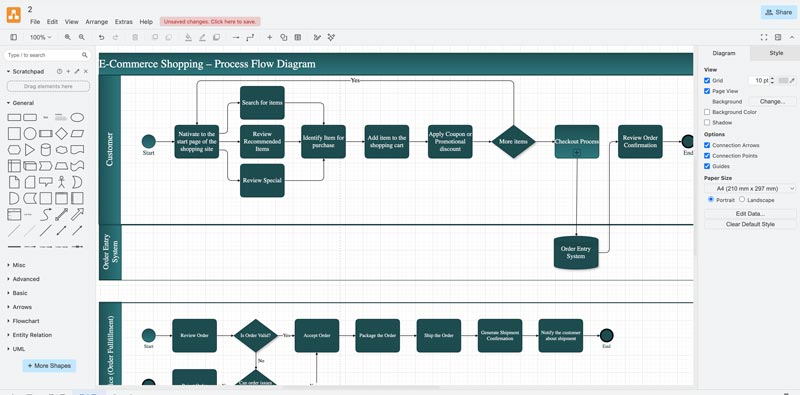
Draw.io (diagrams.net) is a popular Visio viewer that is available online and for installation on Mac or Windows. (License verification is required for corporate use.) It's lightweight and loads VSDX files really fast (even faster than the actual MS Visio).
Other than a Visio reader, many people also use it to create flowcharts, network diagrams, etc. It provides tons of shapes and integrates well with cloud drives.
How to open Visio files online for free with Draw.io:
- Go to the Draw.io website.
- Drag and drop your Visio file to the center interface, or click File >> Open to load files from the cloud.
![]()
- Wait while the file uploads and processes (this can take a minute or two for larger files).
- Once loaded, you can pan and zoom to view your diagram.
Note: Using an online site, you need to upload your file to a third-party server. Be careful to use this method for confidential documents.
Method 3: Open Visio on Mac Using Microsoft 365 (Official Way)
Strengths
- Official Microsoft support for Visio files
- Most accurate rendering, supports .vsdx and .vsd, safe for corporate use.
- Create, view, edit, and collaborate on Visio diagrams
- Supports exporting to .vsdx, PDF and PNG
- Works seamlessly with other Microsoft apps (Word, Excel, PowerPoint)
- Requires a Microsoft 365 subscription with Visio Online access
Weaknesses
- Requires a Microsoft account, internet access, and limited editing.
- No offline use
Best for - Users who need the closest match to real Visio.
Price:
Microsoft 365: $36.00
Visio Plan 1: $5/month
Visio Plan 2: $15/month
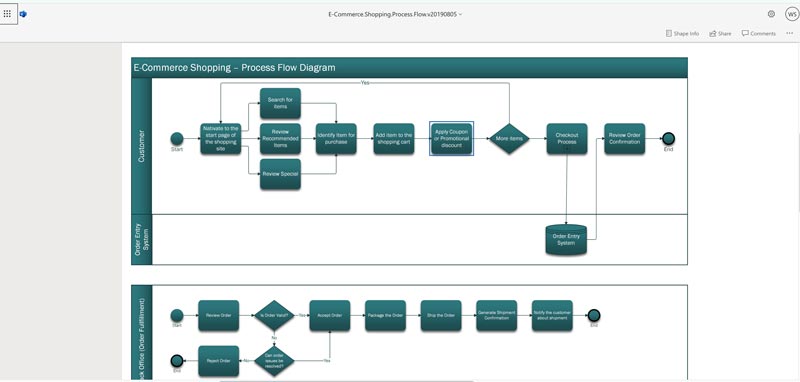
Microsoft Visio for the Web is Microsoft's official web version of Visio Viewer. It offers the most accurate rendering of Visio VSD or VSDX files since it's from Microsoft, but viewing and editing requires Microsoft 365 + Visio Plan
The web version of Visio is a subset of the desktop version of Visio. It provides only the main function, not the full range of features available in the desktop version; some features, such as shape shadows are not implemented in the web version.
How to Open Visio on Mac using Microsoft 365
- Go to visio.cloud.microsoft
- Click Upload to load the files to Visio on Mac
- The files will be uploaded to OneDrive, and you can now view the file or make edits.
![]()
Note: Accounts without Microsoft 365 are limited to 5 GB of OneDrive storage.
Method 4: OmniGraffle - View and Edit Visio VSD or VSDX
Strengths:
- Support Visio files and stencils (.vsd, vsdx,.vdx, vst, .vtx, vss, and .vsx)
- Advanced editing tools for professionals, offer better Mac integration than running Windows virtually
- Edit and customize diagram shapes, styles, and templates
- Available on Mac, iPhone, iPad
Weaknesses:
- Paid software
- Mastering all the features and capabilities may take some time, especially for beginners.
- No real-time team collaboration built in
- Expensive up front cost for full version
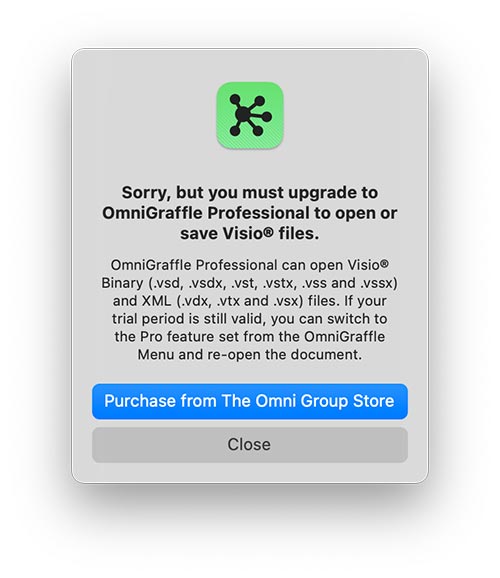
- Though it says free to viewing visio files, but when you open a file for viewing it will ask you to get the pro version.
![]()
Best for — Teams and users who need professional work and seamless Visio interaction
Price:
- v7 Standard License - $149.99
- v7 Pro License - $249.99
Many users on Reddit suggest using OmniGraffle when one need to preserve complex layers in VSDX files.
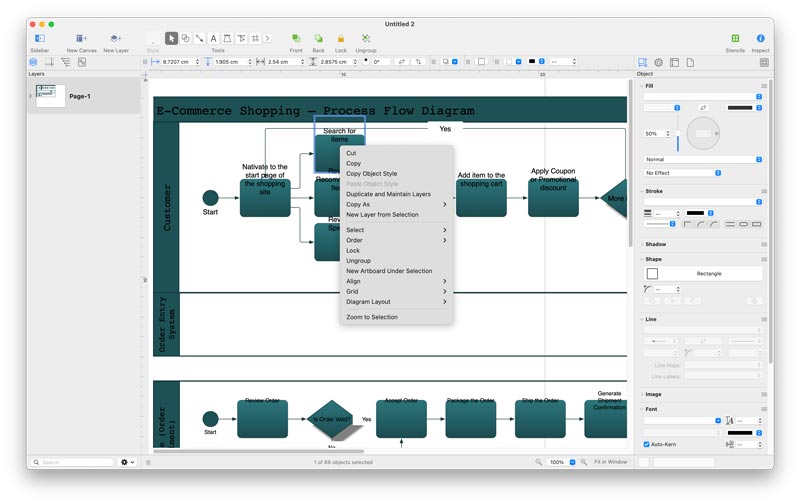
This is really an excellent Visio alternative that runs natively in MacOS, It is a paid tool but you can try it free for 14 days. In free trial period, you get all the features of the Pro version which allows you to open, edit and export Visio files. If you are in education, they offer a very nice discount of 40% off. The interface is very intuitive with many drawing and layout tools, and the Pro version can both import and export Viso files.
How to open Visio files with OmniGraffle:
- Download and install OmniGraffle.
- Click File >> Open in the menu and OmniGraffle will open the file instantly.
![]()
- Make edits to the diagram in the right side bar.
Which Method Should You Use?
Still unsure? We recommend you start with the free options above for quick viewing and here's the check list to help you make the right choice.
Do you only need to view the file?
→ If it’s .vsdx → Use Draw.io (fastest)
→ If it’s .vsd → Use Enolsoft or Microsoft 365 Online
Do you need to share the file with others?
→ Use Enolsoft (Convert to PDF) — Universal format, easy to email or print.
Do you need to edit the file?
→ For simple edits → Draw.io (Diagrams.net)
→ For accurate rendering → Microsoft 365 Online
→ For professional work → OmniGraffle
Do you want a free method?
→ Draw.io
Do you want no installation?
→ Microsoft 365 Online
→ Draw.io
Do you need the most accurate display?
→ Microsoft 365 Online (closest to real Visio)
Need full Visio features?
Run Windows Visio Viewer via Parallels
What are using to open Visio files on Mac? Are there any that we missed? Have an Visio file that you failed to open? Share with us in a comment down below!

Bryan is the Chief Writer at Enolsoft for 15 years. He doesn’t just document software, he is more like a power user that bridges the gap between complex file management systems and the real people who use them, showing users the easiest way to turn digital chaos into streamlined efficiency.
Comments (0)
Leave a Reply