


Enolsoft WPD Viewer User Guide




Enolsoft WPD Viewer for Mac is a lightweight yet powerful WordPerfect Viewer that allows you to open WPD files on Mac without installing Corel WordPerfect. Whether you need to read archived WordPerfect documents, search text, print files, or convert WPD to PDF and extract images from WPD, Enolsoft provides everything you need in one intuitive application.
This guide walks you through every feature of Enolsoft WPD Viewer so you can quickly get started.
Download & Install
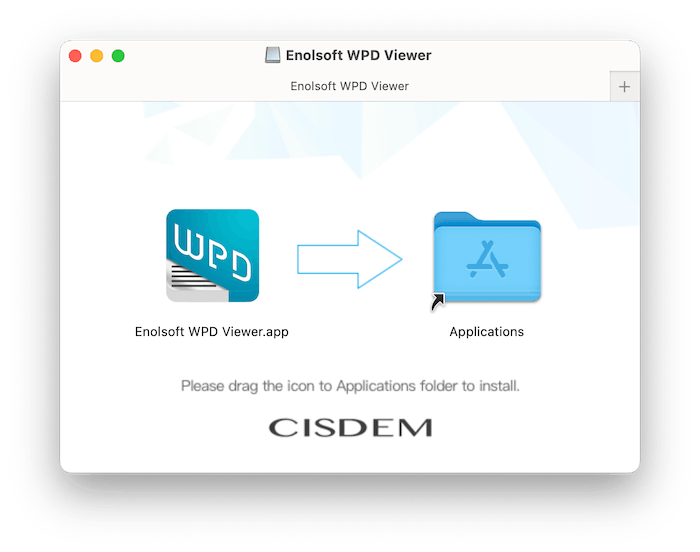
1. Download Enolsoft WPD Viewer from the official website.
2. Open the .dmg file.
3. Drag the app icon into the Applications folder.
Activation
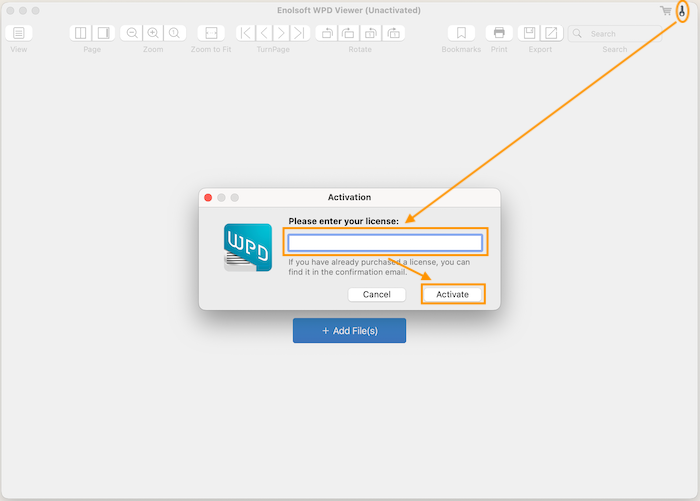
The trial version lets you evaluate the software. To view, convert and print complete WPD files:
1. Launch the app from Applications or Start Menu.
2. Click the key icon in the top-right corner.
3. Enter your license key and click Activate.
Open WordPerfect WPD Files
You can open WPD files in several ways.
2. Open Button: Click  , browse to your WPD files, and click Open.
3. Menu Bar: Choose File > Open or press ⌘ + O
Open Multiple WPD Files
Enolsoft supports multiple tabs. Each document opens in its own tab so you can quickly switch between files without reopening them.
WPD Files View Modes
Enolsoft provides multiple reading modes for different workflows.
Thumbnail View
Click  to enable the thumbnail sidebar to display all pages.
Benefits:
- Quickly jump to any page
- Browse long documents faster
- Easily locate sections visually
Two-Pages View
Display two facing pages simultaneously.
Perfect for:
- Comparing content
- Reading books
- Reviewing layouts
Page-by-Page View
Display one page at a time for distraction-free reading.
Ideal for:
- Books
- Manuals
- Contracts
- Reports
Zoom, Rotate and Navigation Tools
Zoom In/Out
- Zoom In
- Zoom Out
- Actual Size
- Zoom to Fit
These options help you inspect fine details or comfortably read small text.
Rotate Pages
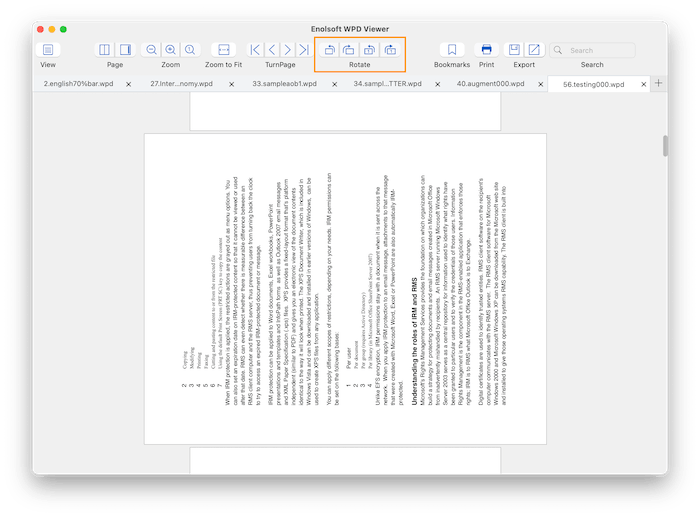
You can rotate all pages or a single page clockwise or counterclockwise using the corresponding buttons  for improved readability.
Useful when scanned pages have incorrect orientation.
Page Navigation
Navigate documents quickly using:
- First Page
- Previous Page
- Next Page
- Last Page
Search Texts in WPD Files
Need to find a keyword in a long WordPerfect document?
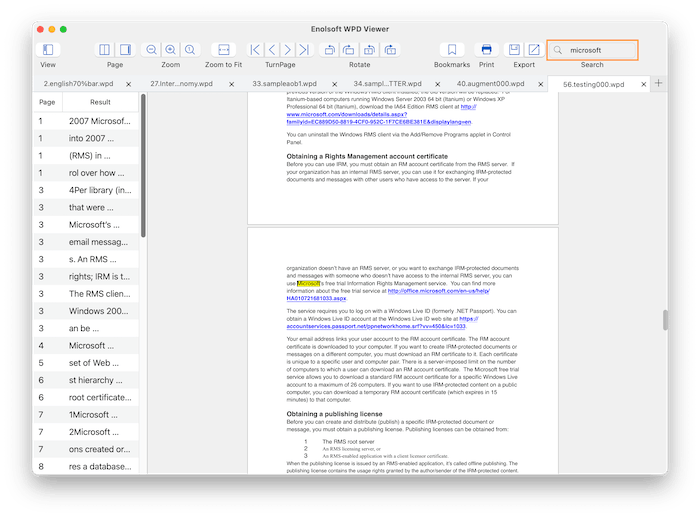
Use the built-in Search tool. Just enter keyword into the Search bar and press the Enter key on your keyboard
Matching results are highlighted instantly, making it easy to locate names, numbers, or phrases.
Add and Manage Bookmarks
Bookmarks help you quickly return to important pages.
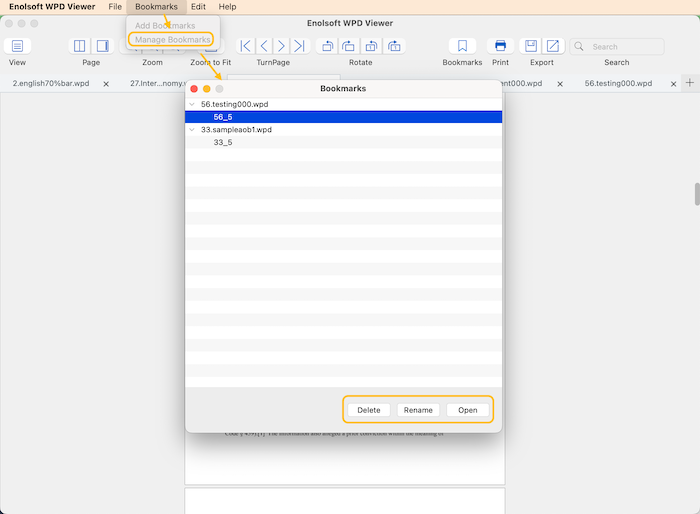
Add Bookmark
Navigate to the desired page and click Bookmark.
Organize Bookmarks
Bookmarks are grouped by document. Click Bookmarks > Manage Bookmarks on the top menu bar, you can:
- Open bookmarked pages directly
- Rename bookmarks
- Delete bookmarks
Print WPD Documents
Click  , print WordPerfect documents directly from macOS.
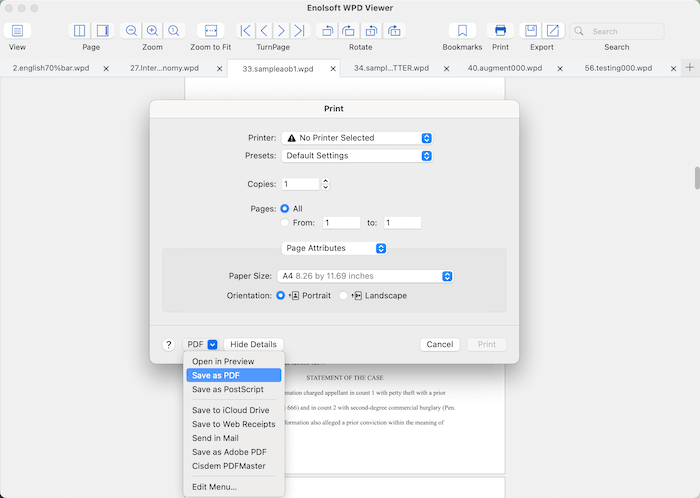
Using the native macOS print dialog, you can customize:
- Page range
- Copies
- Orientation
- Paper size
- Layout
- Scaling
You can also choose Save as PDF from the print dialog for an alternative way to generate PDFs.
Convert to PDF or Extract Images from WPD
Convert WPD to PDF
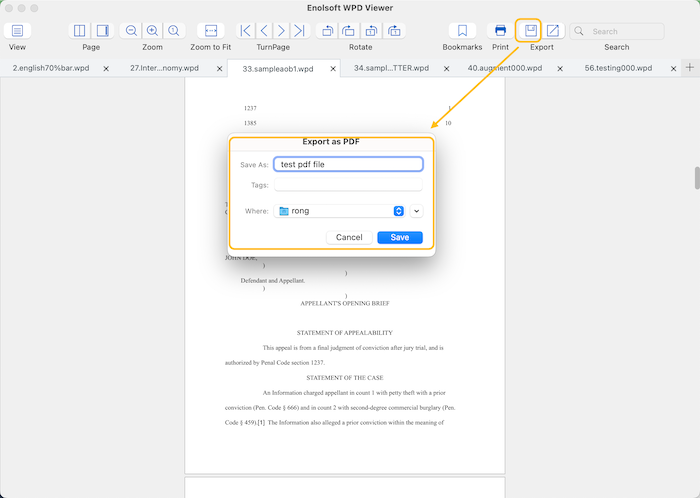
Click  , enter a file name, export documents as PDF while preserving formatting and layout.
Recommended for:
- Sharing
- Printing
- Long-term archiving
Extract Images from WPD Files
If a WordPerfect document contains embedded images, Enolsoft can extract them separately by clicking 
Supported Output
- PNG
Image extraction is useful for:
- Reusing graphics
- Presentations
- Documentation
- Web publishing
Update Enolsoft WPD Viewer
Keeping Enolsoft WPD Viewer updated ensures the best performance and compatibility.
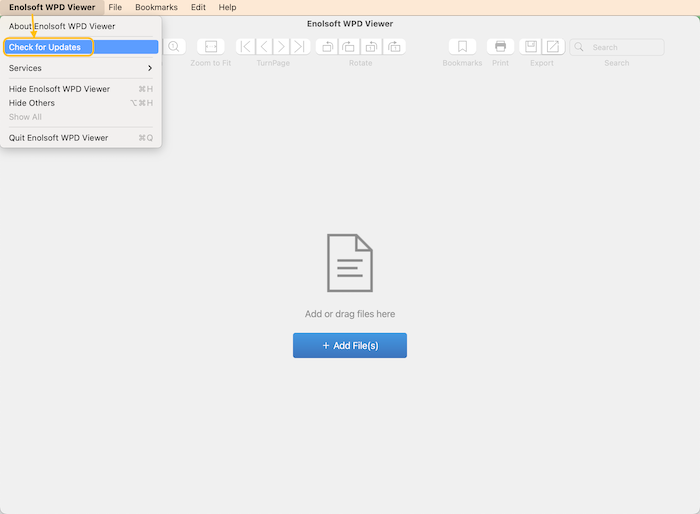
To check for updates:
- Launch the application.
- Click Enolsoft WPD Viewer on the menu bar.
- Select Check for Updates.
- Install the latest version if available.

Bryan is the Chief Writer at Enolsoft for 15 years. He doesn’t just document software, he is more like a power user that bridges the gap between complex file management systems and the real people who use them, showing users the easiest way to turn digital chaos into streamlined efficiency.
Comments (0)
Leave a Reply