


Best PDF to EPUB Converter: How to Convert PDF to EPUB Without Losing Formatting




There’s no doubt PDFs are an ideal format for sharing and archiving. But, if you even tried reading a PDF on a Kindle, Kobo, phone, or tablet, you already know the frustration — tiny text, broken zooming, endless horizontal scrolling, and pages that simply weren’t designed for comfortable reading.
That’s why many people are searching for the best PDF to EPUB converter, the problem is that PDF are fixed format, while EPUB are reflowable. Converting PDF to EPUB without losing formatting is much harder than most blogs make it sound.
In this guide, we’ll compare the best PDF to EPUB converters, including AI PDF converters, explain why formatting issues happen, and show you how to convert PDF to EPUB while preserving as much of the original layout as possible.
The Best PDF to EPUB Converter
![convert PDF to EPUB]()
-
PDF Converter OCR
Convert both native and scanned PDF files to EPUB books
Allow batch conversion
Keep the original formatting, images, hyperlinks, table of contents, etc.
Convert PDF to Word, Excel, PowerPoint, Text, ePub, RTF, HTML, etc.
Support dozens of OCR languages: English, Arabic, Chinese, Spanish, Japanese, Korean, etc.
Create PDF from Word, PowerPoint, Excel, HTML, image, and other documents
Free Download
Why Convert PDF to EPUB?
PDF is the most used document format, they are excellent for preserving the exact appearance of a document, but not for digital reading.
EPUB, on the other hand, was built specifically for digital reading. It uses a reflowable layout, users can easily adjusts text to fit the device’s screen. With EPUB format, Readers can:
- Increase or decrease font size
- Change fonts
- Switch between portrait and landscape mode
- Use dark mode more comfortably
- Read naturally without zooming
How to Check If an EPUB Is Reflowable
After converting your PDF, you can quickly test whether the EPUB is truly reflowable:
- Open the EPUB on an eReader app or device
- Increase the font size
- Rotate the screen orientation
- Try changing font style or spacing
- If the text automatically rearranges and adapts to the new layout, the EPUB is reflowable.
- If the page stays visually identical and behaves like a static image, it’s likely a fixed-layout EPUB.
What Makes a good PDF to EPUB Converter?
- Ease of use We expect it to be easy to use, even for new users. Advantages like a simple intuitive interface and support for dragging and dropping files will provide great user experience.
- High-quality conversion The conversion result is the most important thing. In addition to transforming PDF files into valid EPUB ebooks, the best PDF to EPUB converter should have the ability to retain the original layout, formatting and other elements.
- High-speed conversion Efficiency is equally important. Things like fast conversion and batch conversion feature will make such a converter stand out.
- OCR function The best PDF to EPUB converter should be able to convert any types of PDFs, including the scanned ones, to text-based EPUB format, in order to provide the best possible reading experience on ebook readers. An OCR feature is almost essential.
- Versatility An EPUB converter will be more worth having if it has other useful features such as the ability to convert PDF to other formats like Word and PowerPoint.
- AI-powered conversion Some modern tools also use AI to improve results which gives better layout reconstruction and the ability to handle complex PDFs (tables, multi-column, textbooks)
The above are the basic criteria we considered when we picked the best tool to convert PDF to EPUB format.
Best PDF to EPUB Converters in 2026
ChatGPT as an AI PDF to EPUB Converter
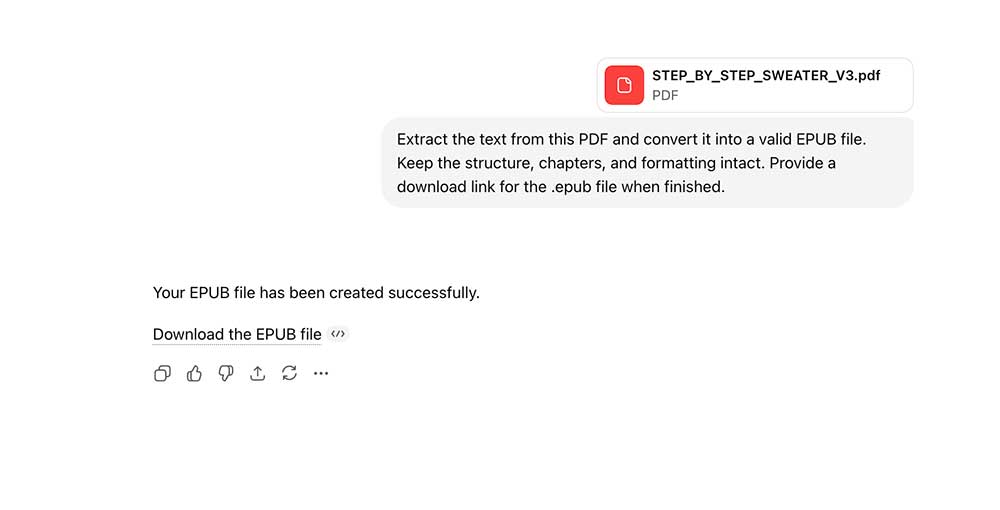
With the rise of AI tools, ChatGPT can also be used as a lightweight PDF to EPUB converter through its data analysis capability. Instead of relying on traditional converters that may break formatting, you can upload a PDF and let ChatGPT extract the text and structure it into an EPUB file. This approach is especially useful for simple documents or when you want more control over how the final ebook is generated.
How to do it:
Upload your PDF to the chat
Use this prompt:
“Extract the text from this PDF and convert it into a valid EPUB file. Keep the structure, chapters, and formatting intact. Provide a download link for the .epub file when finished.”
Why it works:
ChatGPT uses a Python-based process to extract text and package it into an EPUB file.
Limitation:
It may struggle with large PDFs (usually 50–100+ pages) due to processing limits, and often requires manual checking to ensure no text or structure is altered during conversion.
Enolsoft PDF Converter OCR - Best for Scanned PDFs
Enolsoft PDF Converter OCR is a PDF converter, OCR tool and PDF image extractor all rolled into one. You can use it as an effective PDF to EPUB converter for Mac and enjoy the following benefits.
- Convert any PDF files to searchable EPUB with high quality
- Also offer other output formats like Word, Excel, PowerPoint, Text, ePub, RTF, HTML, etc.
- Support conversion of large PDFs (e.g. 20 MB, 50 MB or higher)
- Keep the original images, layout, tables, hyperlinks and more
- Provide a batch conversion mode
- Support dozens of OCR languages: English, Arabic, Chinese, Spanish, Japanese, Korean, etc.
- Extract images from PDF
- Create PDF from Word, PowerPoint, Excel, HTML, image, and other documents
Step 1. Download and install Enolsoft PDF Converter with OCR. Launch it. Drag one or more PDF files into the app.
Step 2. Click the format dropdown list and select the option to EPUB.
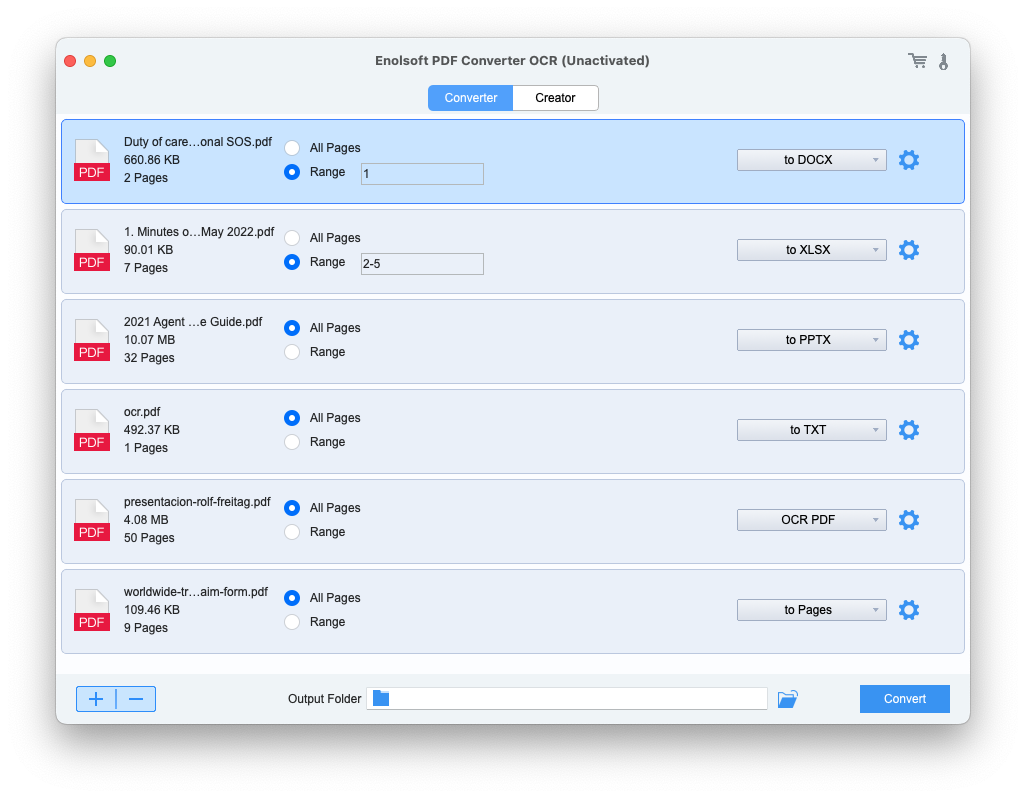
Step 3. Click the Convert button in the lower right corner of the interface. Select a location on your Mac to store the exported ebook. Click Save.
#2 Calibre - Free Open-Source PDF to EPUB Converter
OS: Windows, macOS, Linux
Open-source and cross-platform, Calibre enables users to transform PDF to EPUB and MOBI ebooks for free. In addition to being the best free PDF to EPUB converter, it also offers an impressive list of other feature. For example, you can use it to view ebooks, convert them between different formats and backup your library. A portable version is also available.
Step 1. Open Calibre on your computer. Drag a PDF into the app. Alternatively; you can also add files by going to the menu bar and clicking Add books.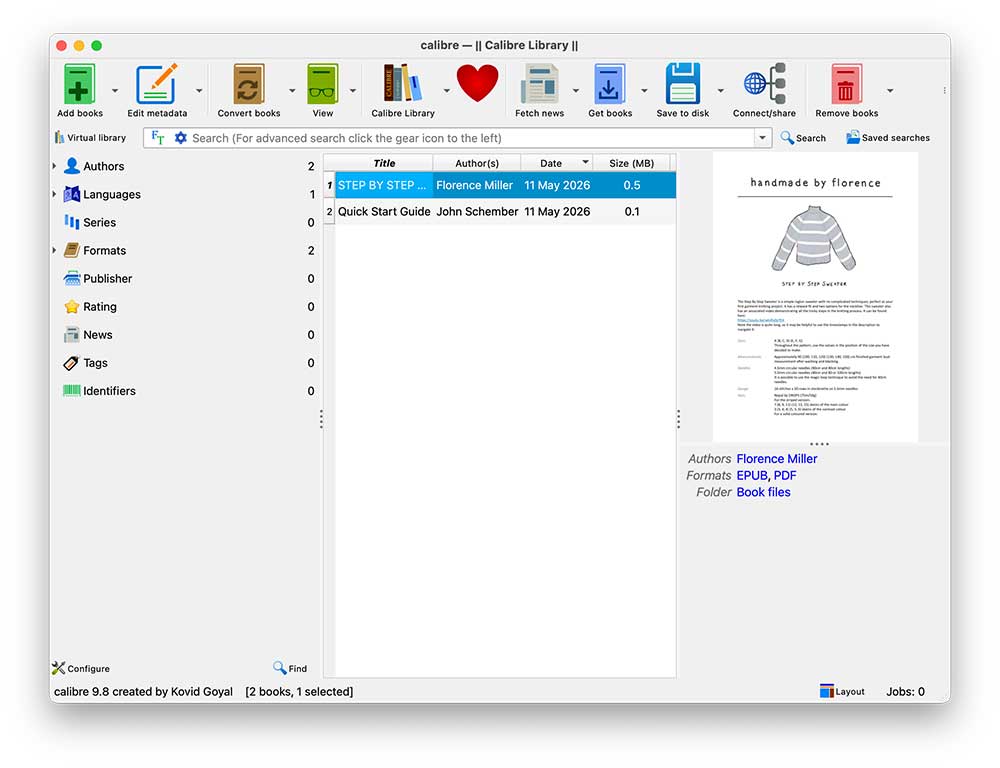
Step 2. Highlight the PDF file you’ve just imported. In the tool bar, select Convert books.
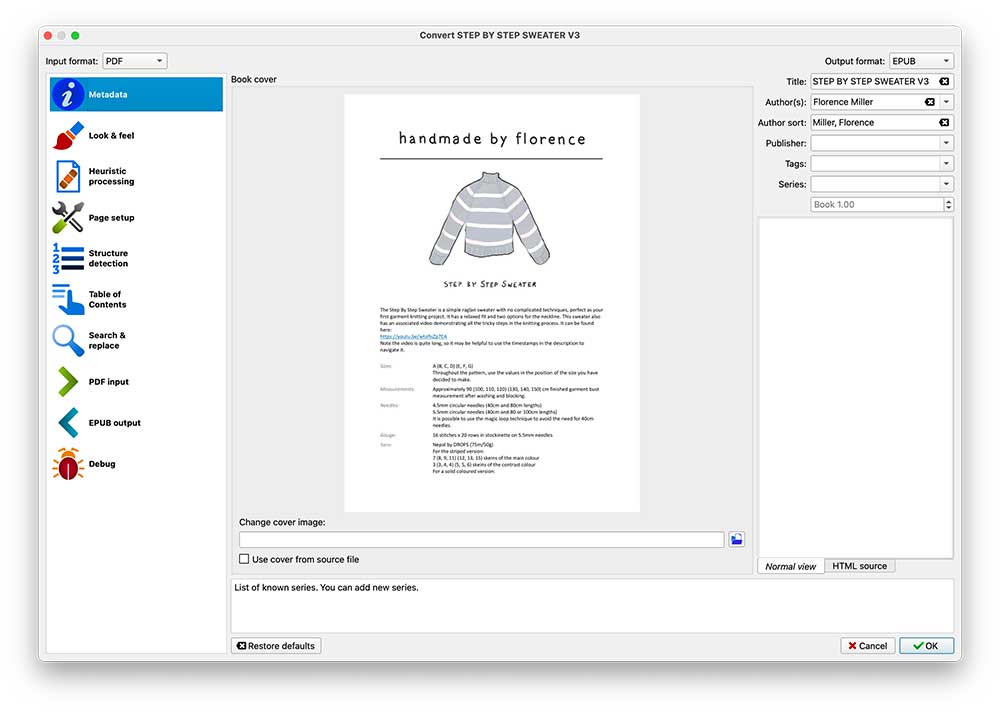
Step 3. The Convert window will pop up, providing an array of options for ebook conversion and optimization. Click the Output format dropdown list in the upper right corner and select EPUB.
Step 4. Click OK to start the conversion from PDF to EPUB. Once the process is completed, you can click the hyperlinked text Click to open in the right panel of the main window and find the converted ebook.
Note: When it comes to non-searchable PDFs, Calibre can only convert them to image-based EPUB, often with blurry and unrecognizable content. To perfectly handle scanned PDFs and alike, it’s recommended to use professional software like Enolsoft PDF Converter with OCR.
Pro tips
Do bulk conversion
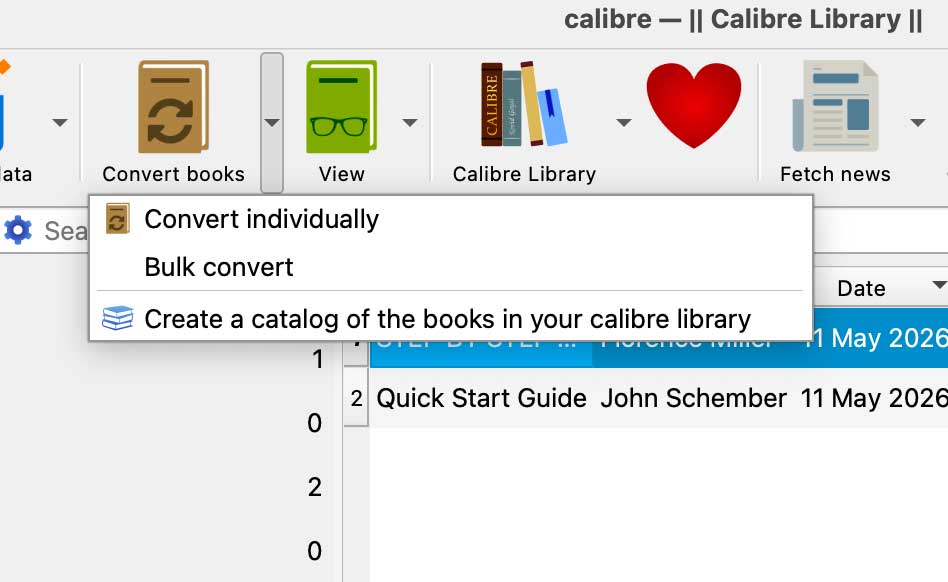
Open this free best PDF to EPUB converter Select all the PDFs you’d like to convert. From the menu bar, click the dropdown icon next to Convert books and choose Bulk convert. Select EPUB as the output format and click OK.
Tweak settings for PDF to EPUB conversion in Calibre
With some PDF files, if you use the default settings, the output will probably be horrible, with misplaced text and wrong formatting. You can improve the situation by customizing settings. Note that in many cases, it will still end up producing a poor result despite the effort. To fix line breaks after conversion, go to Convert window > Heuristic processing. Select the checkbox before Enable heuristic processing and convert again. To convert PDF to EPUB with cover preserving its original aspect ratio, click EPUB output and enable the corresponding option.
#3 Aiseesoft PDF to ePub Converter
OS: Windows, macOS
As one of the best PDF to EPUB converters available for both Windows and Mac users, this app is especially designed for the purpose of converting PDF for EPUB readers.
Step 1. Open the app. Add files by dragging and dropping. You can also import files or folders by clicking the Add File(s) dropdown menu.
Step 2. EPUB is the default and only provided output format, so there is no need to select a format. In the Output Folder section, select a destination location to keep the output ebook.
Step 3. If needed, you can click the Rename button to edit the name of your ebook. In the lower right corner of the interface, you can specify page range for the conversion.
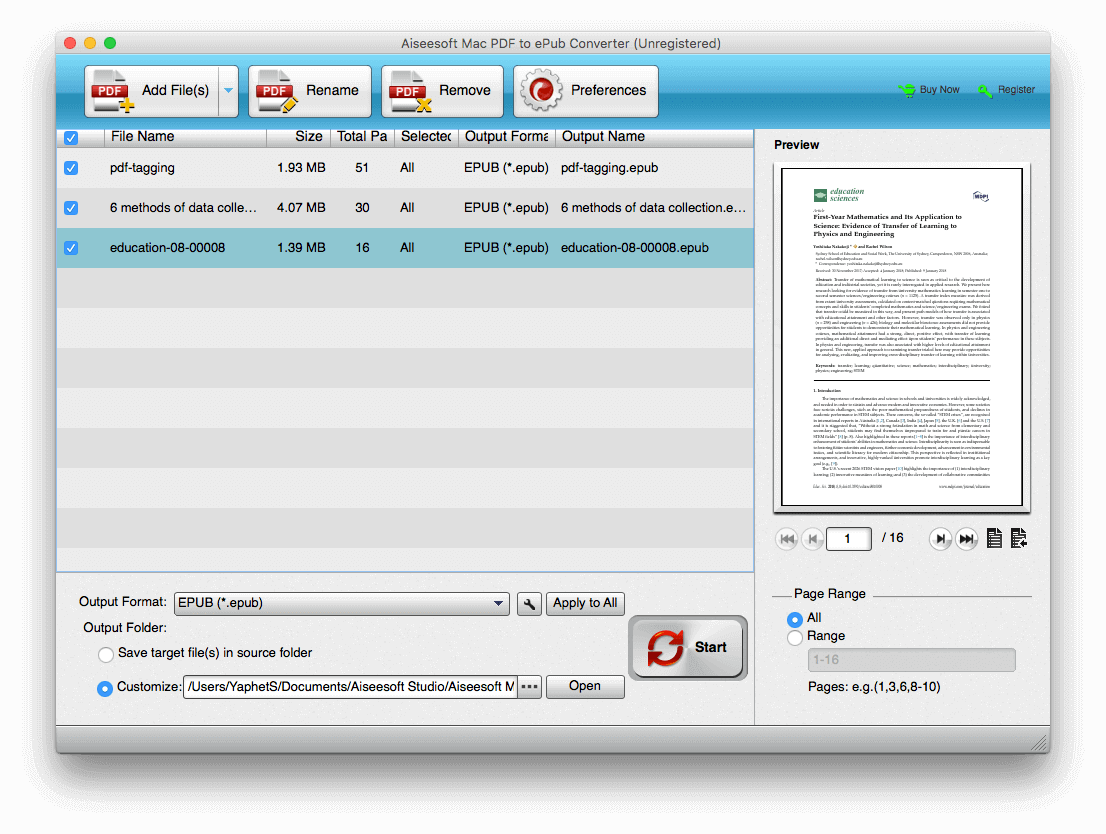
Step 4. Click the big Start button to perform the conversion.
Note: In the tests, this tool failed to keep the tables of contents of some PDFs.
Pro tip
Click the Preferences button and you can configure settings to get better result for image PDFs. Go to the OCR tab. There are three modes: Accuracy, Balanced and Speed. If your scanned PDF is in a foreign language, say, Japanese, you need to select the language. Otherwise, the conversion won’t work properly.
Online-Convert — Best for Quick Browser-Based Conversion
With online-convert.com users can easily upload PDF files for conversion. In addition to EPUB, it also support other 8 ebook formats such as Sony LRF and FB2.
Step 1. Visit https://ebook.online-convert.com/convert-to-epub. Upload a PDF document from your computer or Dropbox or Google Drive.
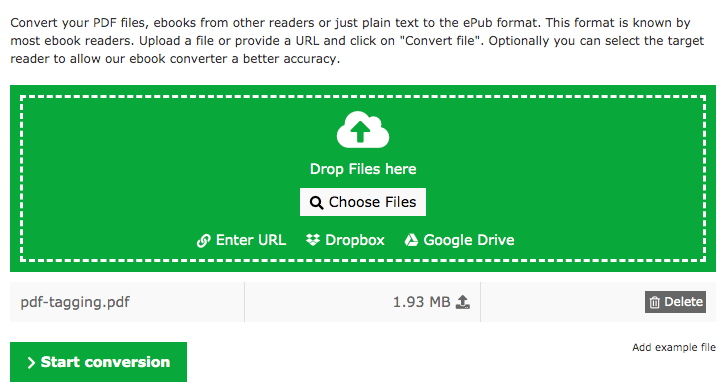
Step 2. Once the file is uploaded completely. You can click Start conversion button to do the conversion.
In the Optional settings section of the best PDF to EPUB converter online, you can easily customize the conversion. If you don’t know which format an ebook reader supports, you can click the Target ebook reader list and select your device. Also, there are options allowing you to add borders and change font, among others, which can be useful.
To have better conversion experience and still enjoy free service, you can register for free. There are of course some limits. For example, the maximum file size is 100 MB. To reduce the limit and enjoy fast conversion, you can upgrade to premium user.
Zamzar — Best Online PDF to EPUB Converter
Zamzar provides an easy instant solution for PDF conversion online and can convert PDF to 16 ebook formats such as EPUB, MOBI and AZW.
Step 1. Go to https://www.zamzar.com/convert/pdf-to-epub/. Upload one or more PDFs by clicking Add Files button. In the Files to Convert section, you can see the list of PDFs uploaded successfully.
Step 2. Click the Choose Format dropdown list and select the output format you need. In this case, we choose EPUB.
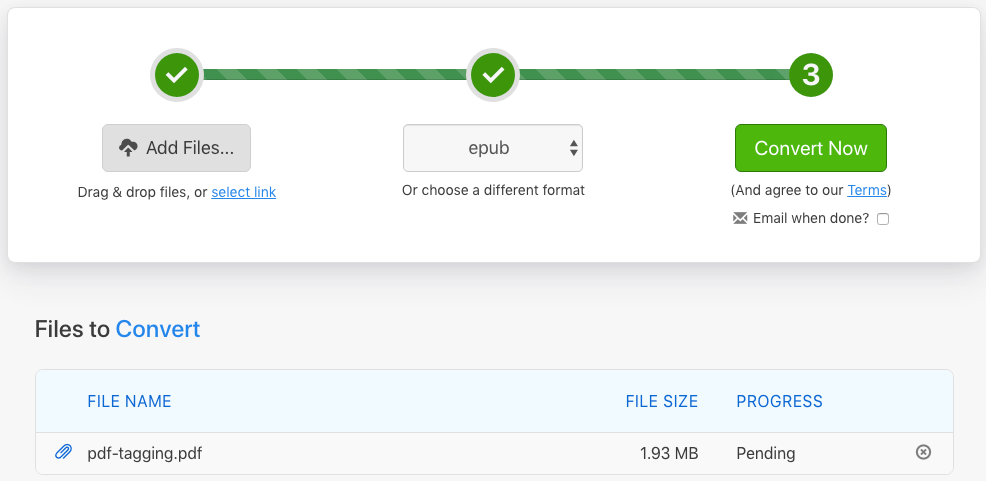
Step 3. Click Convert Now. The progress bar will inform you of the conversion process. Once it’s done, you will be redirected to the download page. Click Download to save the ebook to your device.
You can use Zamzar PDF to EPUB converter for free, but with the limit of 2 conversions per day. To have unlimited conversions with faster speed, you can sign up for one of their paid plans. If your PDF file is searchable and has simple layout, this free online service will do a decent job of converting it to a valid EPUB book. However, if it’s complex and image-rich, it’s recommended to use professional tools. Although the table of contents won’t go missing after conversion, it won’t work properly anymore.
Ebook Converter - Convert PDF to EPUB on Android
OS: Android
As the best PDF to EPUB converter for Android, it supports almost all common ebook formats. You only need to import a PDF, select the EPUB as the output format and tap the Convert button. It’s that easy.
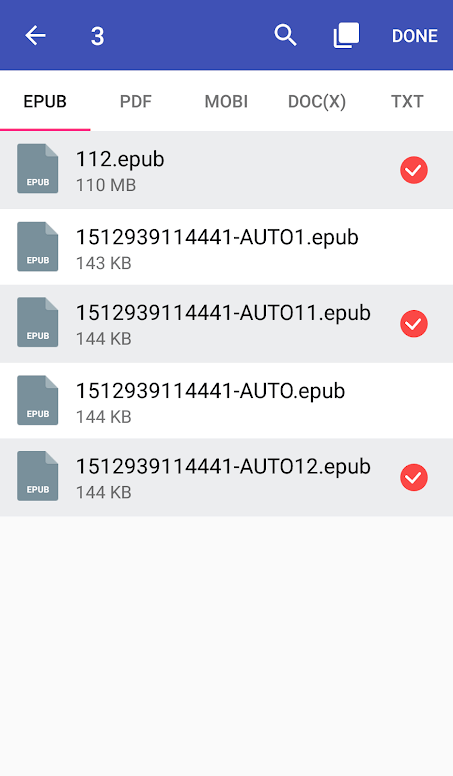
It also offers minor features, and you can easily edit book tile and add your own cover. Note that the app doesn’t work offline. The conversion speed depends on the Internet connection and PDF file size. Once the conversion is finished, the original PDF file will be deleted from the service’s server. The converted ebook will be deleted one hour later.
If your PDF is image-rich with complicated layout, mobile apps like this one is not the best choice. You can do the conversion on computer and then transfer the ebook to Android phone for reading.
The Ebook Converter - Convert PDF to EPUB on iOS
OS: iOS
To do a conversion from PDF to EPUB on iPhone or iPad, this app can help. It’s free to use with in-app purchase provided. As the name suggests, it’s designed to convert files and documents to read on ebook readers. It only takes three steps. Upload your PDF, select the output format and tap the conversion button. In addition to PDF, it also supports some other input formats such as AZW, DOCX, HTML and TXT.
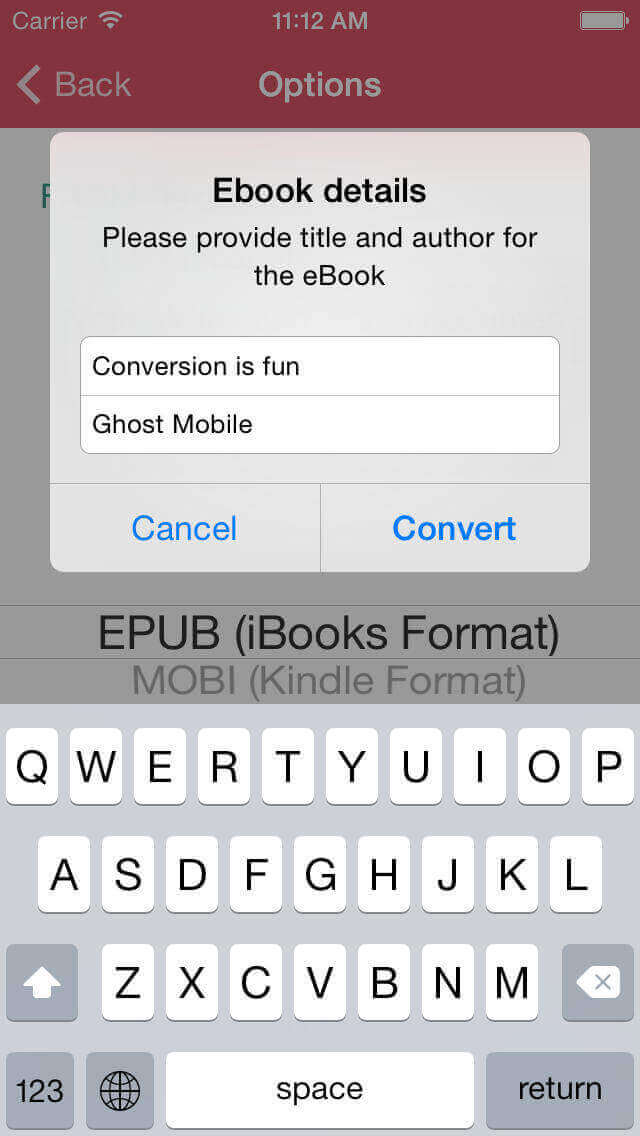
As it works on a cloud server, Internet connection is needed. If your document contains something confidential or you’d rather convert offline, then you can ignore this app and choose a safer solution.
Final Thoughts: Choosing the Right PDF to EPUB Converter
Converting PDF to EPUB is easy if you have the right tools. Different tools handle formatting, OCR, and layout preservation in very different ways, for simple task you can use free tools like online PDF to EPUB converter or calibre. If you’re dealing with complex PDFs or large conversion tasks, especially where formatting really matters, it’s worth choosing a more advanced tool or AI-assisted approach to get better results.

Bryan is the Chief Writer at Enolsoft for 15 years. He doesn’t just document software, he is more like a power user that bridges the gap between complex file management systems and the real people who use them, showing users the easiest way to turn digital chaos into streamlined efficiency.
Comments (0)
Leave a Reply